Infrastructure as Code: Introduction to Terraform
Provisioning infrastructure manually isn't always fun. And having to provision it manually at an odd hour is even worse.
While docker (and the container stack) help superfast automated deployments, that are really helpful in CI/CD or testing, when your system spreads out over a bunch of infrastructure resources, you need an automated way to provision that infrastructure.
Thats where Terraform kicks in!
Terraform lets you define your infrastructure as code - in a text file that you can easily modify and have it reflect in your actual deployment.
I'm a practical guy, so before I even talk about its benefits, I'll first...
...Jump into the code!
Taking the introductory docker example as a no cost & beginner friendly example.
terraform {
  required_providers {
    docker = {
      source  = "kreuzwerker/docker"
      version = "~> 4.2.0"
    }
  }
  required_version = "~> 1.7"
}
terraform.tf
The above snipped initializes a docker provider. This means that you can now specify docker deployment templates which terraform will automatically apply for you. Run terraform init to fetch and initialize the provider.
lain@wired $ terraform init
Terraform has been successfully initialized!

You may now begin working with Terraform. Try running "terraform plan"
to see any changes that are required for your infrastructure. All
Terraform commands should now work.

If you ever set or change modules or backend configuration for
Terraform,rerun this command to reinitialize your working directory.
If you forget, other commands will detect it and remind you to do so
if necessary.
So let's quickly create such a file that tells us what docker container we need to spin up and what configuration that should have.
provider "docker" {}

resource "docker_image" "nginx" {
  name         = "docker.mirror.hashicorp.services/nginx:latest"
  keep_locally = false
}

resource "docker_container" "nginx" {
  image = docker_image.nginx.image_id
  name  = "tutorial"
  ports {
    internal = 80
    external = 8000
  }
}
main.tf
This snippet:
- creates a resource of type
docker_imagesets its name, i.e. image asnginx:latest - creates a resource of type
docker_containerand sets its image to use the previously created image resource - sets the host port
8000map to container port80(which is where Nginx is running)
To run this, execute terraform plan to see a summary of what will be done if you apply this. This should print out the configuration that will be applied. At the end you can see a summary:
  # docker_image.nginx will be created
  + resource "docker_image" "nginx" {
      + id           = (known after apply)
      + image_id     = (known after apply)
      + keep_locally = false
      + name         = "docker.mirror.hashicorp.services/nginx:latest"
      + repo_digest  = (known after apply)
    }

Plan: 2 to add, 0 to change, 0 to destroy.
To actually apply it, run terraform apply.
  # docker_image.nginx will be created
  + resource "docker_image" "nginx" {
      + id           = (known after apply)
      + image_id     = (known after apply)
      + keep_locally = false
      + name         = "docker.mirror.hashicorp.services/nginx:latest"
      + repo_digest  = (known after apply)
    }

Plan: 2 to add, 0 to change, 0 to destroy.

Do you want to perform these actions?
  Terraform will perform the actions described above.
  Only 'yes' will be accepted to approve.

  Enter a value: yes

docker_image.nginx: Creating...
docker_image.nginx: Still creating... [00m10s elapsed]
docker_image.nginx: Creation complete after 16s [id=sha256:6415da96b72a2f6ff433053df1da4bd507e45bc44b2c83dbac0ddeea80c6f066docker.mirror.hashicorp.services/nginx:latest]
docker_container.nginx: Creating...
docker_container.nginx: Creation complete after 1s [id=a6250164b5eba180cd89b5757372eeb2db4579a484b4dec45930ba36edb497d4]

Apply complete! Resources: 2 added, 0 changed, 0 destroyed.
Now that completes the infrastructure deployment. We can see that the container was indeed created if you run docker container ls.
a6250164b5eb 6415da96b72a "/docker-entrypoint.…" 53 seconds ago Up 53 seconds 0.0.0.0:8000->80/tcp tutorialYou can even use curl to see the default nginx page.
curl localhost:8000Before moving on with the practical, let's see what benefits we have from such an approach of having infrastructure defined as code.
What benefits does it present?
To understand the benefits, we need to grasp the idea that Terraform lets you define your infrastructure needs as code. It is a text file that contains the exact specifications of your infrastructure. Provisioning no longer needs manual clicks on a buggy web console where humans will make mistakes. Terraform makes it reproducible and reliable.
Starting off with, it ensures that anyone on your team working on the codebase can get exact same deployment environment as you intended. That is one step in reducing the "it works on my machine" problem. Irrespective of who deploys this infrastructure, they're guaranteed to get the same configuration, same network topology, same servers, same images.
This further means that any issue in infrastructure configuration can be caught by any team member and brought to notice before it reaches production.
Being defined as code, your infrastructure can now be tracked with version control. You can see exactly when you changed your provider from docker to something else or when you expanded your server capacity etc. We'll do these in the next section.
Additionally, being able to represent infrastructure as code, now your complex systems that depend on multiple components - like an S3 bucket, Lambdas, DynamoDB table, API gateway, ec2 instances with load balancer together can be deployed in automated manner - allowing you to integrate it with CI/CD pipelines and run automated testing on the codebase.
It puts infrastructure as a part of the GitOps paradigm and reduced the role of a human in the loop clicking buttons on a clunky cloud web console.
Let's do something less trivial - Using Hetzner as a provider
Say, your deployment requires you to create a VPS of a given specification. You need to be able to create those on the fly as and when your pipeline runs. While Terraform does support Google Cloud, Azure, AWS etc, I'll use Hetzner for the demonstration, just because its cheapest of the lot.
Let's edit terraform.tf to add a Hetzner provider. We will let the docker provider stay, as we'll see later how terraform intelligently removes the running docker container when our infrastructure definition changes.
terraform {
  required_providers
    docker = {
      source  = "kreuzwerker/docker"
      version = "~> 4.2.0"
    }
    hcloud = {
      source  = "hetznercloud/hcloud"
      version = "1.65.0"
    }
  }
  required_version = "~> 1.7"
}

# Set the variable value in *.tfvars file
# or using the -var="hcloud_token=..." CLI option
variable "hcloud_token" {
  sensitive = true
}

# Configure the Hetzner Cloud Provider
provider "hcloud" {
  token = var.hcloud_token
}
terraform.tf
Upon running terraform init, we note that it fetches hcloud provider.
Initializing provider plugins found in the configuration...
- Finding hetznercloud/hcloud versions matching "1.65.0"...
- Reusing previous version of kreuzwerker/docker from the dependency lock file
- Using previously-installed kreuzwerker/docker v4.2.0
- Installing hetznercloud/hcloud v1.65.0...
- Installed hetznercloud/hcloud v1.65.0 (signed by a HashiCorp partner, key ID 5219EACB3A77198B)

Initializing the backend...

Initializing provider plugins found in the state...
- Reusing previous version of kreuzwerker/docker
- Using previously-installed kreuzwerker/docker v4.2.0
I will now edit main.tf to completely remove the older docker related definitions and replace it with a new resource for hcloud_server.
resource "hcloud_server" "node1" {
  name = "node1"
  image = "debian-12"
  server_type = "cx23"
  location = "hel1"
  public_net {
    ipv4_enabled = false
    ipv6_enabled = true
  }
}
main.tf
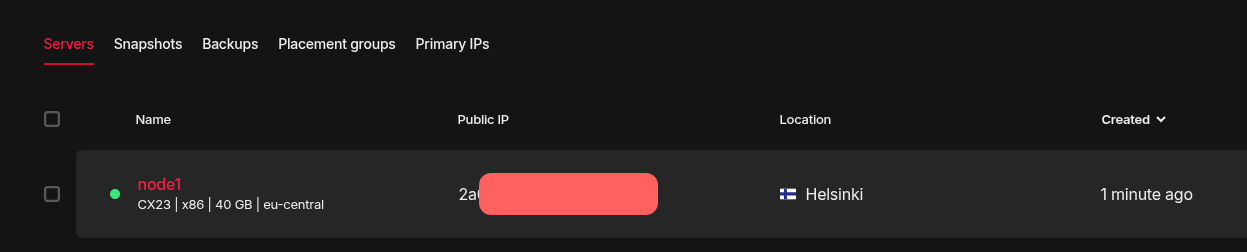
This is fairly straightforward. We are creating a server, named node1 that runs Debian 12 and is of type CX23, located in hel1 (Helsinki), with ipv6 enabled and ipv4 disabled. CX23 is a server offering from Hetzner, that runs on shared vCPU and is a cost effective server for playing around.
Let's run terraform plan to see what changes it detects.
  # docker_image.nginx will be destroyed
  # (because docker_image.nginx is not in configuration)
  - resource "docker_image" "nginx" {
      - id           = "sha256:6415da96b72a2f6ff433053df1da4bd507e45bc44b2c83dbac0ddeea80c6f066docker.mirror.hashicorp.services/nginx:latest" -> null
      - image_id     = "sha256:6415da96b72a2f6ff433053df1da4bd507e45bc44b2c83dbac0ddeea80c6f066" -> null
      - keep_locally = false -> null
      - name         = "docker.mirror.hashicorp.services/nginx:latest" -> null
      - repo_digest  = "docker.mirror.hashicorp.services/nginx@sha256:6415da96b72a2f6ff433053df1da4bd507e45bc44b2c83dbac0ddeea80c6f066" -> null
    }

  # hcloud_server.node1 will be created
  + resource "hcloud_server" "node1" {
      + backup_window              = (known after apply)
      + backups                    = false
      + datacenter                 = (known after apply)
      + delete_protection          = false
      + firewall_ids               = (known after apply)
      + id                         = (known after apply)
      + ignore_remote_firewall_ids = false
      + image                      = "debian-12"
      + ipv4_address               = (known after apply)
      + ipv6_address               = (known after apply)
      + ipv6_network               = (known after apply)
      + keep_disk                  = false
      + location                   = "hel1"
      + name                       = "node1"
      + primary_disk_size          = (known after apply)
      + rebuild_protection         = false
      + server_type                = "cx23"
      + shutdown_before_deletion   = false
      + status                     = (known after apply)

      + public_net {
          + ipv4         = (known after apply)
          + ipv4_enabled = false
          + ipv6         = (known after apply)
          + ipv6_enabled = true
        }
    }

Plan: 1 to add, 0 to change, 2 to destroy.
The last line gives a pretty good summary:
1 to add- yes thats our new CX23 Hetzner server2 to destroy- the docker image and docker container which we earlier ran
Finally, we will run terraform apply to actually deploy this. Do note that at this point, it will create server on Hetzner and it will bill towards your usage.
Plan: 1 to add, 0 to change, 2 to destroy.

Do you want to perform these actions?
  Terraform will perform the actions described above.
  Only 'yes' will be accepted to approve.

  Enter a value: yes

hcloud_server.node1: Creating...
docker_container.nginx: Destroying... [id=a6250164b5eba180cd89b5757372eeb2db4579a484b4dec45930ba36edb497d4]
docker_container.nginx: Destruction complete after 1s
docker_image.nginx: Destroying... [id=sha256:6415da96b72a2f6ff433053df1da4bd507e45bc44b2c83dbac0ddeea80c6f066docker.mirror.hashicorp.services/nginx:latest]
docker_image.nginx: Destruction complete after 0s
hcloud_server.node1: Still creating... [00m10s elapsed]
hcloud_server.node1: Creation complete after 12s [id=142690636]

Apply complete! Resources: 1 added, 0 changed, 2 destroyed.
As we can see, it does indeed destroy our older docker containers (as it was removed from the definition) and creates a new server on Hetzner. If you login to your Hetzner console from a web browser, you can even see that.
Updating your infrastructure
Let's say, as you work, your infrastructure requirements change in following ways:
- you want to have your server in Falkenstein, for lower pings
- you feel the need to have an ipv4 address too
- you realize that the starter CX23 with 4GB RAM is too less for your application and upgrading to a CX33 is needed
- additionally, you want another CX23 server to act as a backup
You can, at this point, login to your Hetzner console and manually make all these changes. But let's face it - its error prone and there's no log of you doing these changes. This is where Terraform makes our life easier. Let's modify our main.tf specification for implementing above requirements.
resource "hcloud_server" "node1" {
  name = "node1"
  image = "debian-12"
  server_type = "cx33"
  location = "fsn1"
  public_net {
    ipv4_enabled = true
    ipv6_enabled = true
  }
}

resource "hcloud_server" "backup_node" {
  name = "backup_node"
  image = "debian-12"
  server_type = "cx23"
  location = "fsn1"
  public_net {
    ipv4_enabled = false
    ipv6_enabled = true
  }
}
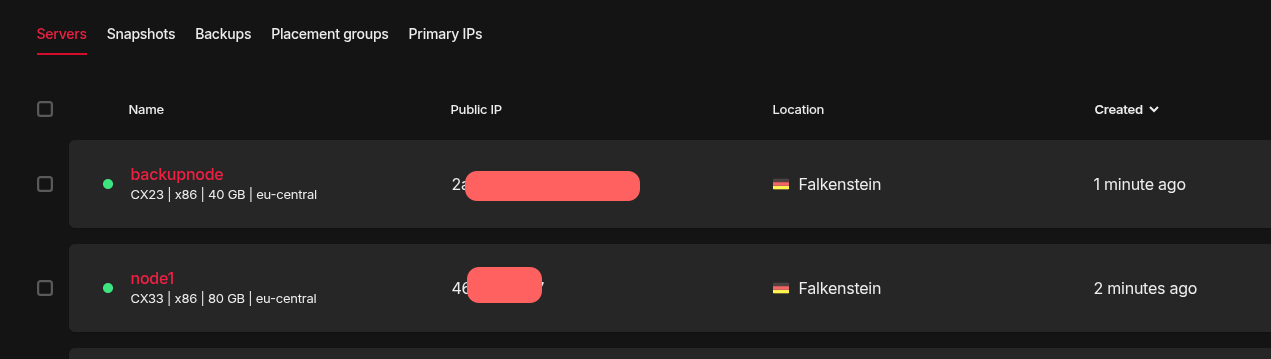
We have changed node1 to use CX33 server type, be located in Falkenstein and have ipv4 enabled. Additionally, we created another hcloud_server resource that uses CX23 and is located in Falkenstein. To see what changes are registered, we run terraform plan.
Terraform will perform the following actions:

  # hcloud_server.backup_node will be created
  + resource "hcloud_server" "backup_node" {
      + backup_window              = (known after apply)
      + backups                    = false
      + datacenter                 = (known after apply)
      + delete_protection          = false
      + firewall_ids               = (known after apply)
      + id                         = (known after apply)
      + ignore_remote_firewall_ids = false
      + image                      = "debian-12"
      + ipv4_address               = (known after apply)
      + ipv6_address               = (known after apply)
      + ipv6_network               = (known after apply)
      + keep_disk                  = false
      + location                   = "fsn1"
      + name                       = "backup_node"
      + primary_disk_size          = (known after apply)
      + rebuild_protection         = false
      + server_type                = "cx23"
      + shutdown_before_deletion   = false
      + status                     = (known after apply)

      + public_net {
          + ipv4         = (known after apply)
          + ipv4_enabled = false
          + ipv6         = (known after apply)
          + ipv6_enabled = true
        }
    }

  # hcloud_server.node1 must be replaced
-/+ resource "hcloud_server" "node1" {
      + backup_window              = (known after apply)
      ~ datacenter                 = "hel1-dc2" -> (known after apply)
      ~ firewall_ids               = [] -> (known after apply)
      ~ id                         = "142690636" -> (known after apply)
      + ipv4_address               = (known after apply)
      ~ ipv6_address               = "2a01:4f9:c012:85ee::1" -> (known after apply)
      ~ ipv6_network               = "2a01:4f9:c012:85ee::/64" -> (known after apply)
      - labels                     = {} -> null
      ~ location                   = "hel1" -> "fsn1" # forces replacement
        name                       = "node1"
      - placement_group_id         = 0 -> null
      ~ primary_disk_size          = 40 -> (known after apply)
      ~ server_type                = "cx23" -> "cx33"
      ~ status                     = "running" -> (known after apply)
        # (7 unchanged attributes hidden)

      - public_net {
          - ipv4         = 0 -> null
          - ipv4_enabled = false -> null
          - ipv6         = 0 -> null
          - ipv6_enabled = true -> null
        }
      + public_net {
          + ipv4         = (known after apply)
          + ipv4_enabled = true
          + ipv6         = (known after apply)
          + ipv6_enabled = true
        }
    }

Plan: 2 to add, 0 to change, 1 to destroy.
It clearly understood the task - recreating our current server and adding a new one. Run terraform apply to bring this into action.
Plan: 2 to add, 0 to change, 1 to destroy.

Do you want to perform these actions?
  Terraform will perform the actions described above.
  Only 'yes' will be accepted to approve.

  Enter a value: yes

hcloud_server.node1: Destroying... [id=142690636]
hcloud_server.backup_node: Creating...
hcloud_server.node1: Still destroying... [id=142690636, 00m10s elapsed]
hcloud_server.node1: Still destroying... [id=142690636, 00m20s elapsed]
hcloud_server.node1: Still destroying... [id=142690636, 00m30s elapsed]
hcloud_server.node1: Destruction complete after 32s
hcloud_server.node1: Creating...
hcloud_server.node1: Still creating... [00m10s elapsed]
hcloud_server.node1: Creation complete after 16s [id=142693611]
hcloud_server.backupnode: Creating...
hcloud_server.backupnode: Still creating... [00m10s elapsed]
hcloud_server.backupnode: Creation complete after 11s [id=142693889]
The logs indicate it destroyed a server and created 2 new ones. We can see the same on our console too.
Destroying resources
Finally, let's say you wish to now delete the resources. A simple terraform destroy is enough to delete all resources.
Plan: 0 to add, 0 to change, 2 to destroy.

Do you really want to destroy all resources?
  Terraform will destroy all your managed infrastructure, as shown above.
  There is no undo. Only 'yes' will be accepted to confirm.

  Enter a value: yes

hcloud_server.backupnode: Destroying... [id=142693889]
hcloud_server.node1: Destroying... [id=142693611]
hcloud_server.backupnode: Still destroying... [id=142693889, 00m10s elapsed]
hcloud_server.node1: Still destroying... [id=142693611, 00m10s elapsed]
hcloud_server.backupnode: Destruction complete after 16s
hcloud_server.node1: Destruction complete after 16s

Destroy complete! Resources: 2 destroyed.
Gone. In a single command.
So that was it!
As I discussed the benefits above - Terraform makes it really easy to manage and track your infrastructure. Make it a part of your CI/CD pipelines and enjoy better access to ever changing infrastructure needs! Make sure to destroy any resources you no longer need, to avoid unnecessary billing.
Here are some links to get you started:
 HashiCorp
Documentation homepage
Tutorials listed for popular provider - GCloud, AWS, Docker, Oracle, Azure

Terraform registry, where you can search for more providers. This is where I found the provider for Hetzner

